
Settlement Verifier
The Settlement Verifier is a community tool on data.chain.link that lets anyone check the Chainlink Data Streams price that settles a market at a 5-minute boundary. Pick a date and a boundary time, and the tool returns the report's mid price, bid and ask prices, and the timestamps that define the window the report covers. No wallet, code, or Data Streams account is required.
It was designed and shipped for prediction markets, which can link to it so their users can independently check the price a market settled on.
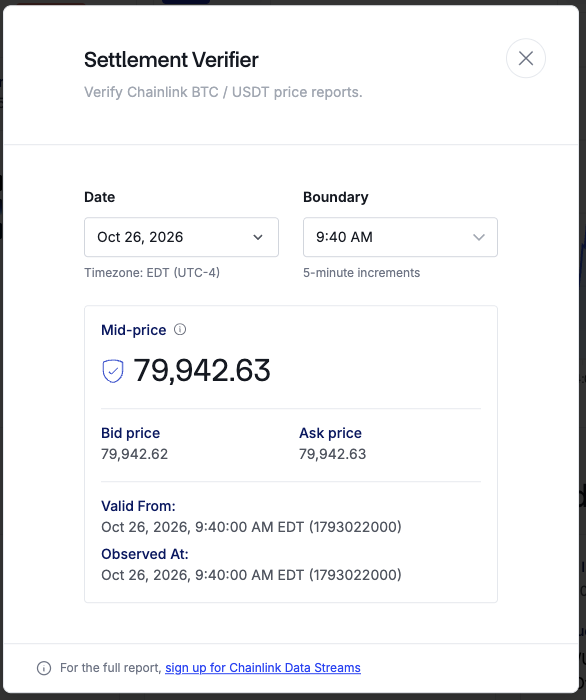
The Settlement Verifier for BTC / USDT
Who it's for
- Traders and community members who want to confirm the price used to settle a market without reading raw report data or writing code.
- Prediction market operators who want to give their users a public, neutral place to check settlement prices. Link to the stream page on data.chain.link from your market's resolution details.
How it relates to onchain verification
Onchain report verification is still the way applications trust Data Streams reports. A smart contract submits the signed report to the VerifierProxy contract, which checks the signatures from the Decentralized Oracle Network (DON) before your application uses the data. That is what keeps an onchain settlement trustless, and the Settlement Verifier does not replace it.
The Settlement Verifier answers a different question for a different audience: "What price did Chainlink report at this boundary?" It gives non-technical users a way to look up and read the report that settled a market. Builders who need cryptographic guarantees in their own contracts should still verify reports onchain.
Supported streams
The Settlement Verifier is available on every stream listed on data.chain.link. It appears as a button before Explore docs on each stream's page.
Use the Settlement Verifier
- Open the stream page on data.chain.link, for example BTC/USDT, and select Settlement Verifier.
- Choose a Date. You can select any day within the last 30 days.
- Choose a Boundary. Boundaries are in 5-minute increments in your local time zone, which the tool displays under the date. Only boundaries that are more than 15 minutes old are available.
- Select Look up price.
The result shows:
| Field | Description |
|---|---|
| Mid-price | The aggregated weighted-average price between the bid and ask prices, converted into the quote currency. |
| Bid price | The bid price from the report. |
| Ask price | The ask price from the report. |
| Valid From | The start of the window the report covers, shown in your local time and as a Unix timestamp. |
| Observed At | The time the report's price was observed, shown in your local time and as a Unix timestamp. |
For a boundary report, Valid From and Observed At are the same instant, the boundary itself.
When no report lands exactly on the boundary
Data Streams reports are produced continuously, but a report is not guaranteed at every second. If no report was observed exactly at the boundary, the Settlement Verifier shows the next report. Its Valid From and Observed At timestamps show the window it covers, which contains the boundary. If no report covers the boundary, the tool tells you instead of showing a price.
Limits
- Boundaries must fall on a 5-minute mark, be more than 15 minutes old, and be within the last 30 days.
- Lookups use Data Streams mainnet reports. Testnet is not supported.
- The tool shows price data only. For the full signed report, sign up for Chainlink Data Streams and fetch reports directly.